NoFeedback
Automatic feedback suppressor for live sound, streaming and recording. VST3 for Windows.
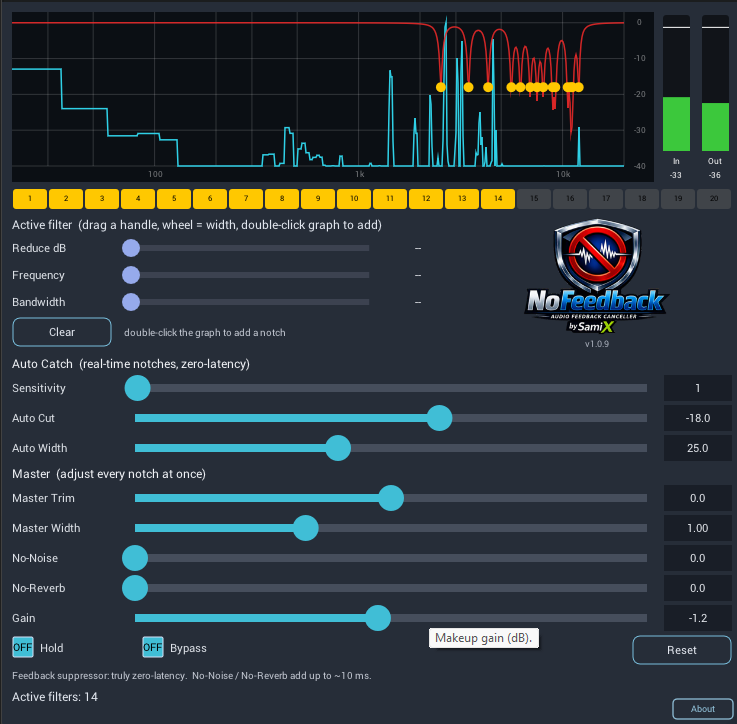
Features
- Auto Catch
- Listens for ringing frequencies and notches them automatically. Adjust Sensitivity to decide how quickly it reacts, Auto Cut for how deep each notch goes, and Auto Width for how narrow it is.
- 20 notch filters
- Automatic and manual filters share a bank of 20. Select any filter to set its cut, frequency and bandwidth, or clear it.
- Live spectrum
- See what the microphone hears and where each notch sits. Drag a handle to move a filter.
- Master Trim and Width
- Adjust all filters at once when the room changes.
- Hold
- Freeze the current filters, so nothing new is added during a show.
- No-Noise
- AI-based noise reduction for speech and vocals: hiss, hum and background noise.
- No-Reverb
- Reduces room echo and reverb tail on voices.
- Latency
- 0 ms for feedback suppression. About 11 ms while No-Noise or No-Reverb is on; your DAW compensates automatically.
- Sample rates
- 44.1 kHz to 192 kHz. Mono and stereo.
Trial and full version
| Trial | Full version | |
|---|---|---|
| Features | All features | All features |
| Use | Runs 2 minutes, then pauses (muted) for 30 seconds, repeating | Unlimited |
| License key | Not needed | Needed, activated once on each computer |
| Internet | Not needed | To activate, then at least once every 30 days |
| Price | Free | Contact us |
Download
Version 1.0.9 for Windows 10 and 11, 64-bit, VST3.
NoFeedback Trial
NoFeedback_Trial_1.0.9_Win64.zip
Try every feature with no key. Muted for 30 seconds every 2 minutes.
Download trialNoFeedback full version
NoFeedback_1.0.9_Win64.zip
Needs a license key. Stays silent until activated.
Download full versionInstall
- Unzip the downloadYou get a folder named NoFeedback.vst3 (or NoFeedback_Trial.vst3).
- Copy it to your VST3 folderC:\Program Files\Common Files\VST3
- Rescan plugins in your DAWNoFeedback appears under the manufacturer SamiX.
Get a license
Licenses are sold directly. Tell us how many computers you need and we will reply with the price and your license key.
- Request a licenseUse the contact page or email [email protected].
- Receive your keyIt looks like NFB-XXXXX-XXXXX-XXXXX-XXXXX.
- Activate in the pluginOpen NoFeedback, click About, copy your key and press Paste. It activates straight away.
System requirements
- Operating system
- Windows 10 or 11, 64-bit
- Plugin format
- VST3, in any 64-bit VST3 host
- Internet
- Full version: to activate, and at least once every 30 days. Trial: not needed.
- macOS
- Not available yet.
Questions
Where do I put the license key?
In the plugin: click About, then Paste. You can also click the key box, type the key and press Enter.
What happens if I am offline for a while?
Nothing, for up to 30 days. The plugin checks its license when it can. If it has not reached the license server for 30 days it mutes until you are online again, then unlocks by itself.
I bought a new computer. How do I move my license?
On the old computer, open About and press Deactivate, then activate on the new one. If the old computer is gone, contact us and we will release it.
Does the trial expire?
No. It keeps pausing for 30 seconds every 2 minutes, so you can test as long as you need.
Can I install the trial and the full version together?
Yes. They appear as two separate plugins, NoFeedback_Trial and NoFeedback.
Is there a Mac version?
Not yet. Contact us if you would use one.